
N Smart Travel Gadgets That Actually Simplify International Trips
You are standing in a Lisbon hotel room at midnight, phone at 3%, when you realize the outlet on the wall looks nothing like the plug on your charger. The adapter you meant to pack is still on your kitchen counter. This is the exact problem that every travel gadget article is supposed to prevent — yet most of those lists are full of UV luggage sterilizers and Bluetooth water bottles that never leave the bag.
Most Travel Gadgets Are Solving Problems You Don’t Have
The travel gear market thrives on pre-trip anxiety. Someone spending $2,000 on flights will happily spend $40 on something that sounds vaguely useful. Most of that gear sits unused.
The products worth carrying solve four real problems: dead batteries, disrupted sleep, unreliable data connections, and lost luggage. Everything else is optional at best. Start from that filter and the list gets short, fast.
This is not financial advice, and it is not a sponsored list. These are independent assessments based on what actually performs in the field.
Power and Charging: Where Most International Travelers Make Their First Mistake
Dead batteries and mismatched plugs are the most predictable problems in international travel. They are also the easiest to solve permanently — if you buy the right things once.
Voltage vs. Plug Shape: Two Completely Different Problems
This is the mistake that costs people expensive equipment. Plug adapters change the physical shape of the connector. They do nothing about voltage.
The US runs on 110–120V. Most of Europe, East Asia, and Australia runs on 220–240V. If you plug a 110V-only device into a 220V outlet — even through a shape adapter — you can destroy it. Check the small print on your charger brick. If it reads ‘100–240V, 50/60Hz,’ you are covered worldwide. If it says only ‘120V,’ you need a voltage converter, not just an adapter.
Most modern phone chargers, laptop bricks, and camera batteries are dual voltage. Hair dryers, electric shavers, and older electronics often are not. Check before you pack, not after you land.
The Compact Charger Worth Buying
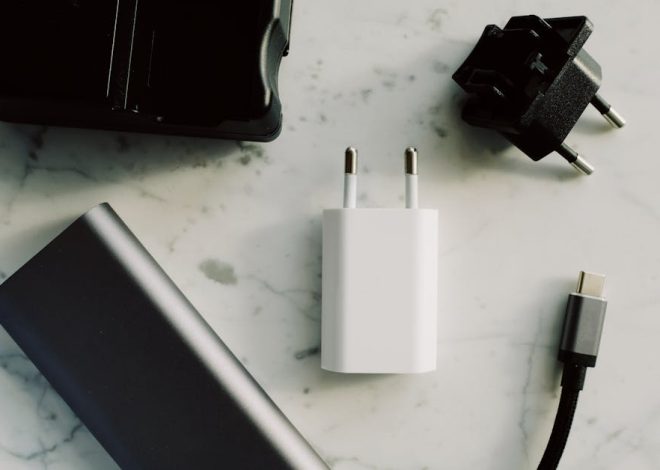
The Anker 735 GaN Charger ($36) outputs 65W — enough to fast-charge a MacBook Air, an iPhone 15, and a third USB-A device simultaneously. It folds to roughly 50 × 50 × 28mm and comes bundled with interchangeable plug heads for US, UK, EU, and Australian outlets. It is dual voltage. It replaces your laptop brick and your phone charger in one device smaller than a deck of cards.
The Ugreen 65W Nexode ($32) is functionally equivalent and a few dollars cheaper. Either works. What does not work: cheap universal adapters with four USB ports built in. They run hot, deliver inconsistent wattage, and fail at the worst possible time.
Power Banks and the Airline Rule That Catches Travelers Off Guard
The Anker PowerCore 20000 ($46, 74Wh) delivers roughly four full iPhone charges. At 74Wh, it stays well under the standard 100Wh carry-on limit for lithium batteries imposed by most airlines.
The rule that surprises people: power banks cannot go in checked luggage. Airlines flag them at check-in. Lithium batteries in cargo holds are a fire hazard — they must travel in the cabin. Always pack your power bank in your carry-on, not your checked bag.
Bottom Line: The Anker 735 and PowerCore 20000 together cost about $82 and permanently solve the power problem. Nothing else in charging comes close at that price-to-utility ratio.
Tip: Before buying any plug adapter, verify your existing chargers are dual voltage. The label is printed in small text directly on the charger brick, near the input and output specs. Most modern devices are dual voltage — but confirm before you assume.
Noise-Canceling Headphones: One of the Few Categories That Lives Up to the Hype
A 12-hour flight with sustained engine noise at 80–85dB is genuinely tiring in a physiological sense. Good active noise cancellation (ANC) reduces that by 20–30dB. That gap is the difference between arriving functional and arriving wrecked.
Sony WH-1000XM5 vs. Bose QuietComfort 45: The Direct Comparison
The Sony WH-1000XM5 ($279–$350 depending on retailer and timing) has stronger sound quality, a more customizable EQ via the Headphones Connect app, and 30 hours of ANC battery life. The Bose QuietComfort 45 ($229–$279) has a slightly more comfortable fit for extended wear — relevant if your ears run warm after hour four — and simpler controls that require no app. Battery runs 24 hours with ANC active.
Both have industry-leading noise cancellation. The honest recommendation: buy whichever is cheaper when you are ready to purchase. On an airplane with 80dB of engine noise, the sonic difference between them is minor.
Skip the Beats Studio Pro ($349). The ANC does not match either Sony or Bose, and you are paying for branding. That is a poor trade.
When Earbuds Are the Smarter Choice
Over-ear headphones dominate on overnight long-haul flights. They are less practical for day trips, walking tours, and situations where you switch them on and off constantly. The Sony WF-1000XM5 earbuds ($199–$249) have the best ANC in the true wireless category — approximately 6 grams per earbud versus 250 grams for the over-ear set.
The tradeoff is real: earbud drivers do not block low-frequency engine rumble as effectively as over-ear cups. On a 10-hour red-eye, over-ear wins. On a 2-hour regional hop or a city day-trip, earbuds are the lighter, more versatile pick.
Bottom Line: Match the product to the trip type, not just the brand. Over-ear for overnight flights. Earbuds for everything else.
Tip: If you plan to use an eSIM abroad — and you should — activate the plan before your departure flight, not at the destination airport. Most eSIM activation requires a working internet connection. Set it up at home on Wi-Fi and confirm it is live before you board.
Connectivity Abroad: What the Three Main Options Actually Cost
This is where most travelers either dramatically overpay or get caught with no data at a critical moment. The table below uses real 2026 pricing for a head-to-head comparison.
| Option | Typical Cost | Setup Required | Best For |
|---|---|---|---|
| Carrier International Add-On | $10–$15/day or $50–$100/month | None | Trips under 3 days, or travelers who will not configure alternatives |
| Airalo eSIM (regional plan) | $10–$20 for 30 days | App install + QR code, done before departure | Solo travelers and couples on trips under 3 weeks |
| Local SIM Card | $5–$15 one-time | Purchase at destination, swap physical SIM | Stays over 3 weeks in a single country |
| Pocket Wi-Fi (e.g., Skyroam Solis X) | $8–$15/day rental or $149 to own | Device rental pickup or purchase | Groups of 3 or more sharing one data connection |
For most solo or two-person international trips under three weeks, Airalo is the clear winner. A regional Europe plan runs $12–$18 for 30 days of data. That is under $0.60 per day. Your carrier’s $15/day international add-on costs 25 times more for the same data. The Airalo setup takes about 10 minutes: download the app, search your destination, buy a plan, scan the QR code, and add the eSIM in your phone settings.
The Skyroam Solis X ($149 to own, $8/day for a global day pass) only justifies the cost when multiple people need simultaneous data from one source. As a solo traveler paying device cost plus daily fees on top of the data plan eSIM would have covered at a fraction of the price — it is a difficult number to defend.
Bottom Line: Confirm your phone supports eSIM (most phones from 2026 onward do), download Airalo, set it up before departure. This single decision saves most travelers $50–$200 per trip with zero hardware added to the bag.
When to Leave the Gadget at Home
Does your trip actually need a dedicated camera?
Probably not. Modern flagship phones shoot 48MP RAW photos and 4K video at 60fps. For city travel, architecture, street photography, and food, the phone handles it. A dedicated camera earns its bag weight only in specific cases: wildlife photography requiring optical zoom past 5x, adventure sports needing a waterproof body, or professional work where sensor size and lens quality are genuinely non-negotiable.
The honest question to ask yourself: will you actually edit these photos in post, or will they end up in the same camera roll folder as your phone shots? If the answer is the latter, the extra weight does not pay off.
Do you need a portable Wi-Fi router?
Only if three or more people on the trip all need simultaneous data, or your phone is old enough not to support eSIM. Solo travelers and couples where both phones are eSIM-compatible have no practical reason to carry a pocket Wi-Fi device. It is one more item to charge, one more thing to track, and it costs more than an eSIM plan once you add up the device price or rental fee.
What about standalone translation devices?
Skip them. Google Translate with downloaded offline language packs handles restaurant menus, street signs, and basic conversation without any data connection. Download the language packs before departure on Wi-Fi. The only scenario where a dedicated translator pays off is traveling somewhere with genuinely no phone or data access whatsoever — which describes almost no standard international trip in 2026.
Tip: Apply a simple consolidation test to any gadget before buying: does it replace something you already carry, or does it add to the pile? A GaN charger that eliminates your laptop brick and phone charger is a replacement. A travel pillow is an addition. Replacements earn their weight. Additions usually do not.
Luggage Tracking: A $29 Decision With a Clear Payoff
Airlines mishandled roughly 6–7 bags per 1,000 passengers in recent years, per Department of Transportation data. That sounds small until it is your bag containing medication, business attire for a Monday morning meeting, or a camera kit.
An Apple AirTag ($29, requires iPhone for full functionality) or a Tile Mate ($25, works on both iOS and Android) inside a checked bag does not prevent the airline from losing it. What it does is give you an exact location when the airline’s system says only ‘bag is in the system.’ That changes a passive lost-baggage claim into a specific conversation: ‘Your app says delayed — my tracker shows the bag is still at Gate B-22.’
AirTag runs on Apple’s Find My network, which is dense in major international airports and thinner in rural areas. Tile operates on a smaller community network but remains functional in most global airports. Both are worth having.
Buy one. Put it in every checked bag. At $25–$29, the argument for skipping it is weak.
What Experienced International Travelers Actually Carry
After stripping away everything optional, the core kit that handles the real friction points looks like this:
- Anker 735 GaN Charger ($36) — 65W output, universal plug heads included, replaces your laptop brick and phone charger in one device
- Anker PowerCore 20000 ($46, 74Wh) — four-plus smartphone charges, stays under airline carry-on limits, mandatory in the cabin not checked bags
- Airalo eSIM regional plan ($10–$20) — activate before departure, saves $50–$200 per trip versus carrier daily fees
- Sony WH-1000XM5 ($279–$350) or Bose QuietComfort 45 ($229–$279) — for flights over four hours, this is the clearest quality-of-life upgrade available per dollar spent
- Apple AirTag or Tile Mate ($25–$29) — one per checked bag, every time
Total cost buying everything new: roughly $375–$460. Most of these items last three to five years with regular use, which makes the per-trip cost low after the first year.
What is not on this list: universal all-in-one adapters with USB hubs built in (they fail and run hot), pocket Wi-Fi devices for solo travelers (eSIM is better and cheaper), any gadget marketed as ‘smart’ whose app connectivity serves no practical function, and travel pillows that compress to the size of a dinner roll but still take up real bag space.
Back in that Lisbon hotel room, the scenario resolves differently with this kit in place. The GaN charger with EU plug heads is in the carry-on where it belongs, not buried in checked luggage. The Airalo plan activated when the plane landed at Humberto Delgado Airport. The AirTag confirmed the checked bag arrived at the correct carousel before the walk over from baggage claim. No scrambling. Nothing improvised.
That is what useful travel gear actually looks like — not exciting, just quietly reliable every time you need it.
Independent assessments only. No affiliate relationships or sponsored placements exist .
Related Posts